
More than a password manager.
Protect yourself, your family, or your global workforce with simple security, easy secret sharing, and actionable insight reports.
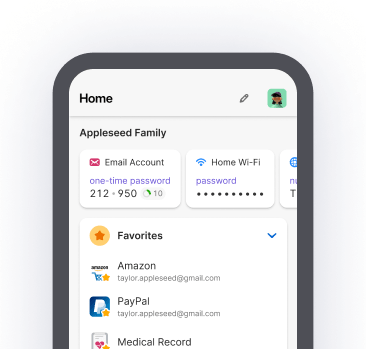
Easily secure passwords, passkeys, and sensitive information.


Over 100,000 businesses trust 1Password
Manage more than just your passwords
What you need when you need it
Passwords? Instant. Checkouts? Seamless. Protect banking information, credit cards, software licenses, and plenty more.
Simple, secure sharing
Set up shared password vaults for easy family or team access. Quickly share any 1Password item from your desktop, app, or browser.
More visibility, less risk
Monitor and mitigate risks like potential data breaches, keep an eye on shadow IT, and reduce support tickets – all in 1Password.
Works with your security stack
Provision automatically with tools you already trust, send log activity to your SIEM tool, and unlock 1Password with SSO to close sign-in security gaps.
Security isn't a feature. It's our foundation.
Explore the 1Password security model
Secure by design
Adding a Secret Key to your account password provides a unique extra layer of security for proven protection.

Private by default
We can’t see passwords or sensitive information stored in 1Password, so we can’t use it, share it, or sell it – and neither can anyone else.

Verified by experts
Regular third-party audits and the industry’s largest bug bounty help us act on threats before they can affect you.

Get started, or get answers
1Password simplifies managing passwords and sensitive information for everyone. Need help? Our support team is top-notch in the industry (go ahead, ask around).
Our use of 1Password is always increasing because it’s easy to access. I feel better knowing that everything is stored securely, and that if there’s a compromise we won’t suffer from an attack.
Mike Parent, Security Engineering Manager at Drift
Recommended resources
GUIDE
Beginner’s guide to password management
New to password managers? Learn why strong passwords are your best defense – and how password managers make generating and storing strong passwords easy.
BUSINESS
Everything you need to know about 1Password’s security model
How is 1Password’s security approach meaningfully different? It starts with our unique, multi-layered approach to protecting your data.
BUSINESS
The Total Economic Impact™ Of 1Password Business
What's the ROI realized by 1Password customers? What are the efficiency gains for your IT team? This Forrester study commissioned by 1Password has the answers.
Frequently asked questions
1Password makes it easy to generate, store, and autofill passwords for all your online accounts, on all your devices. Because weak and reused passwords are a leading cause of security incidents, using a password manager is an easy way to protect yourself, your family, or your business.
1Password is also much more than a password manager. It can safely store your sensitive documents, banking information, medical records, SSH keys (for developers), and many other secrets. It’s easy to share those items and collaborate securely, too. Plus, membership comes with a ton of perks, like Masked Email integration from Fastmail, signing in with other providers like Apple and Google, and actionable security recommendations from Watchtower.